
Planning a Google Analytics 4 Migration Strategy
Written By: Shane Clark on April 22, 2022
Many of you have already gotten an email letting you know that Google Universal Analytics (UA) will be replaced with Google Analytics 4(GA4). The exact phrasing of the email I saw was, “On July 1, 2023, Universal Analytics properties will stop processing new hits.” As I mention in my blog, GA4 is an evolving software, and I only plan to cover many of the higher-level strategies vs. a tutorial for specific GA4 features.

The data from standard Google Universal Analytics (UA) will not transfer over as part of the migration to Google Analytics 4(GA4). This missing data can cause great concern for my clients who use this data for organic SEO and Google Ads. With transparency and planning, many of these concerns can be mitigated.
Running Both Versions in Parallel
My best advice is to get GA4 up and running to collect data while continuing to utilize standard UA as you normally would. Getting GA4 installed immediately will allow you to start collecting data with the GA4 framework. Meanwhile, you can still use the standard Google Universal Analytics. This allows you to continue to use a version that you have a greater level of familiarity with. Running both versions simultaneously will allow you to get over the learning curve of GA4.

Don’t Panic!
As you begin your investigative journey through GA4, you will notice that many of the necessary tools you are using are not there. Even something as simple as setting up a standard view to filter data is not done the same in GA4. The earliest appearances of GA4 seem to lack some of the features of standard UA. I think these will be resolved by the time Google Universal Analytics is decommissioned.
In the cases of web development and marketing agencies, it may be the “end client” that initiates the panic as they realize that their data is going away. The job of the client manager is to control the expectations of the client. Therefore, it is important to reiterate that all efforts are being made to make the transitions as smooth as possible.
Understanding the Later Versions of GA4 Will Most Likely Change
As of the posting of this blog, there are 436 days left before the UA shutdown. The amount of time left still gives the brilliant developers at Google time to address some of the concerns and frustrations that many have with the lack of features and the implementation of GA4 compared to UA. I have seen a lot of GA4 video tutorials. Many state that the viewer may not be seeing the same features that are presented in the video.
Because of the dynamic nature of the development of GA4, I make sure I am a part of any possible social media groups about it to be able to ask questions and collaborate with others. These groups help to develop my knowledge through the experience of others. A group I find helpful is Google Analytics 4 community (GA4) on Facebook, moderated by Analytics Mania. Another valuable resource for general questions will be the Google Analytics Help Community
Choosing the Right GA4 Traning Programs
As I have mentioned on numerous occasions, there is a strong belief in the Google Analytics community that significant changes to the GA4 interface will be coming. Nevertheless, I will post some of the more helpful training I have found. However, you should be on the lookout for anything as recent as possible for a release date. An older training module may not have all the up-to-date features of GA4 that are available.
Familiarizing Yourself with the GA4 Settings
As you start to dive into GA4, you will notice the setting and interface have entirely changed. It is crucial to go through the entire menu of options to understand the changes and capabilities of GA4. I have gone through menu items one by one and noted any parts of the GA4 software I did not fully understand. In a few cases, I would do a “deeper dive” to get other perspectives of GA4 users.
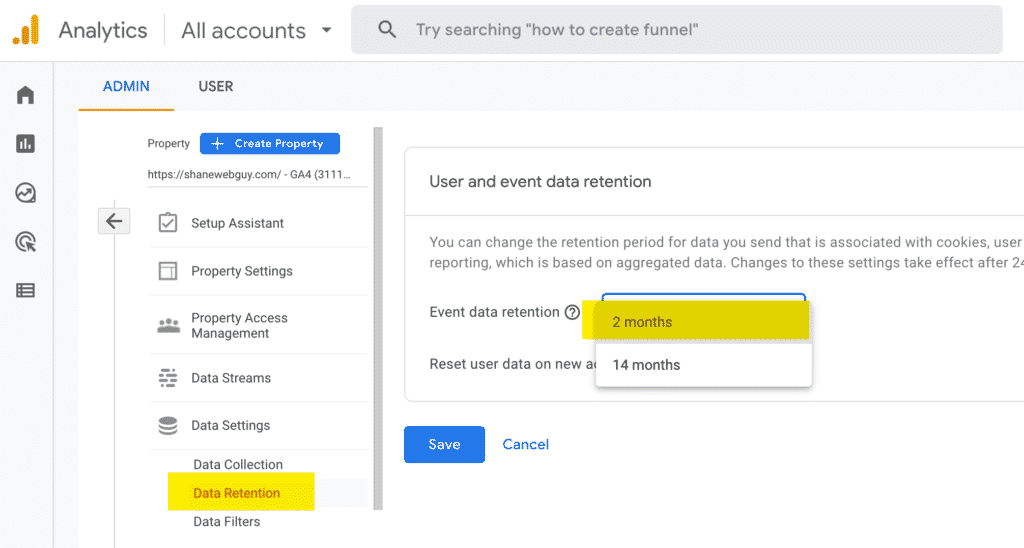
An excellent example of a menu item/setting that is unique to GA4 is under “Data Settings -> Data Retention”. If you refer to my screenshot, Google has set the default to “2 months”. You should change the data retention setting to allow for 14 months of data collection. I recommend recording these settings as part of your setup documentation. Especially focus on the ones that you need to proactively address issues that could cause data loss.
Documenting for Process Control
With standard UA, I am so familiar and in control of my collection/reporting of data, I tend to be lax when it comes to the documentation for an account setup. I am transitioning over to GA4. As I do so, I am more proactive in ensuring that I document every step with accompanying screenshots per account. I am doing this for three primary reasons.
1 – To make sure I do not miss anything in the setup of an account
2 – It allows me to collaborate with others without sharing account access.
3 – If the GA4 software changes, I have a point of reference to refer back to later on.
Conclusion
The transition to GA4 seems unavoidable at this point. It is important to collaborate with other marketing experts to understand both their difficulties and solutions. The way to make this as painless as possible is by learning the software and documenting the process as you go.
